
From manual positioning to adaptive contact and movement support.
Lumbar support has evolved from a largely fixed point of contact into a more responsive relationship between the user, the backrest and the chair’s movement.
Modern lumbar support is not only about where the support is placed. It is also about how that support behaves when the body moves.
Niture Editorial Team
August 2026
Ergonomic Academy
Approximately 12–15 minutes
Important context: The three generations in this article form Niture’s internal design framework for explaining the development of lumbar-support solutions. They are not an official historical classification used by the entire ergonomic-chair industry.
This guide explains chair design and product fit. It does not provide medical diagnosis or treatment.
Early lumbar systems focused primarily on creating a support point for upright sitting. The user manually positioned the support, but the contact could change as the sitting angle changed.
Adaptive lumbar systems added flexibility. Instead of remaining completely rigid, the supporting area could respond to pressure and smaller changes in posture.
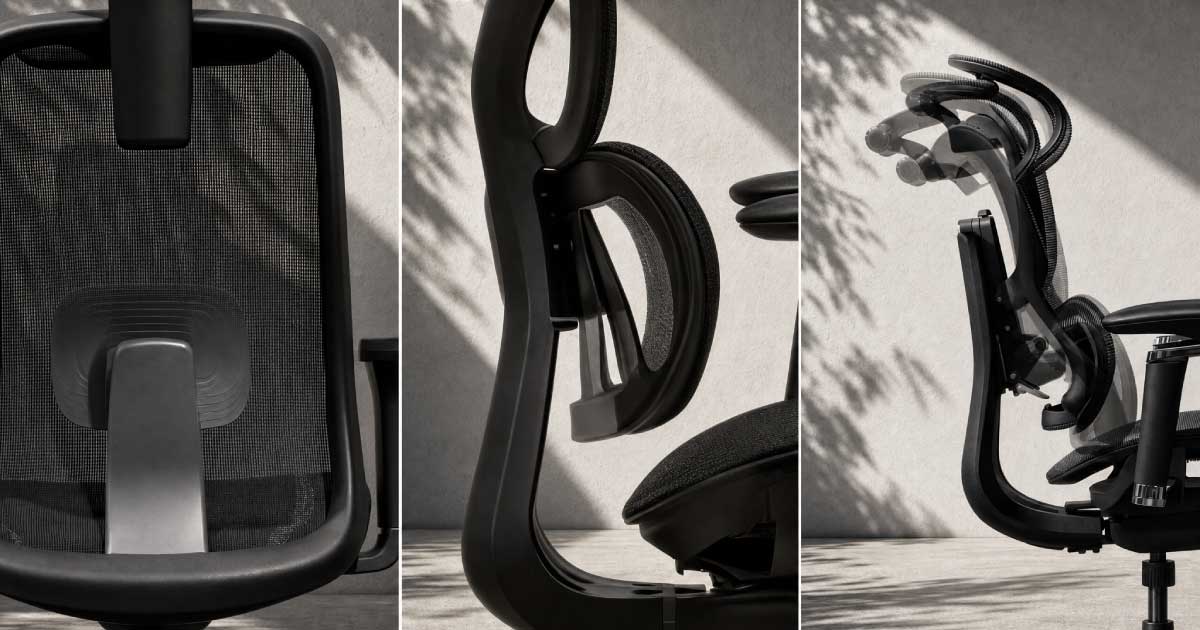
Niture’s third-generation approach combines the lumbar system with movement-supporting backrest technology. In the SINC Series, Smart‑Glide works alongside synchronized recline to increase lower-back contact as the chair moves into recline.
Design determines how the support is positioned, how it responds to pressure and how it behaves when the chair moves.
Body fit determines whether those capabilities meet the correct part of the user’s lower back with a comfortable amount of contact.
Even an advanced support system can feel unsuitable when its position, pressure, seat depth or movement does not match the user.
The lower back has an inward curve. A lumbar-support area is intended to reduce the unsupported space between the user and the backrest.
But sitting is not a single position. During a normal workday, a user may:
Sit upright or lean slightly towards the desk while typing.
Shift the pelvis, shoulders or weight while completing different tasks.
Lean back for a call or reading, then return towards the desk.
The useful question is not only, “Can the chair touch the lower back?” It is, “What happens to that contact when the user changes position?”
The support should meet the lower-back curve rather than the pelvis, tailbone or middle back.
The contact should feel useful without creating a concentrated or uncomfortable pressure point.
The seat, backrest and body proportions must allow the user to reach the intended support area.
The support relationship should remain comfortable as the sitting angle changes.
Ergonomic workstation guidance recommends that the curved part of a chair’s backrest fit the small of the user’s back. It also identifies lumbar-height adjustment and supported recline as useful chair characteristics.
Research examining preferred lumbar-support settings found substantial differences in the height and depth selected by individual office workers. Some participants preferred settings near the limits of the available adjustment range.
There is no single lumbar position or pressure level that is correct for every user.
| Generation | Main design focus | How support is controlled | Relationship with movement |
|---|---|---|---|
| Generation 1 | Positioning the support | Mainly adjusted manually by the user | Contact may change as the chair reclines |
| Generation 2 | Making contact adaptive | Support responds to pressure or posture changes | Better response during smaller body movements |
| Generation 3 | Coordinating support with movement | Lumbar design works with backrest and recline movement | Lower-back contact increases as the chair reclines |
This is not a simple quality ranking. Each generation addresses a different design problem, and some users may still prefer the direct, stable feeling of a manually controlled system.
Support positioned for upright sitting.
The first generation focuses on placing lumbar support in the correct area behind the user’s lower back.
Once adjusted, the lumbar position generally remains stable relative to the backrest. This creates a direct and controllable support point.
Not every manual lumbar system loses contact during recline. The result depends on the complete chair geometry, recline mechanism, adjustment and user.
Manual does not mean ineffective. When its position and shape match the user, a simpler lumbar system can feel more natural than a highly responsive one.
Support that responds to the user.
The second generation adds flexibility to the lumbar area. Instead of functioning only as a manually positioned surface, the system can respond as the user applies pressure or makes smaller posture changes.
Adaptive movement cannot correct a support point that begins too high, too low or too far from the body.
Generation 2 improves how the lumbar area reacts to the body. The next challenge is coordinating that response with the movement of the chair.
Support designed around position changes.
Niture’s third-generation approach expands the design problem beyond the lumbar unit. It considers how the wider supporting surface moves as the user transitions between working and reclined positions.
Determines the shape and character of lower-back contact.
Controls the overall relationship between the seat and backrest.
Adds movement at the supporting surface.
Helps match the recline response to the user.
Determines how the chair contacts the lower-back area.
Controls an additional layer of backrest movement.
The seat and backrest change angle together at a coordinated ratio, controlling the overall transition between focused work and recline.
The supporting surface adds a separate movement intended to increase lower-back contact as the user reclines.
| Movement layer | Primary role |
|---|---|
| Synchronized recline | Controls the overall seat-and-backrest angle |
| Smart‑Glide | Adds movement at the supporting surface |
| Lumbar system | Determines lower-back contact character |
| Combined solution | Coordinates position, contact and movement |
Adjust the seat, backrest, lumbar support, armrests and headrest to suit the user.
The synchronized mechanism changes the overall relationship between the seat and backrest.
Smart‑Glide adds movement at the supporting surface.
The lower back gains more contact as the chair opens into recline.
The mechanism supports the transition back towards a focused working position.
More noticeable lower-back contact as the chair enters recline.
Less interruption between focused work and supported recline.
Less need to repeatedly push backwards to find the backrest.
A more present supporting surface against the lower back.
Recline becomes a supported position rather than only a resting angle.
A smoother transition back towards the desk and working position.
Body weight, torso length, lumbar position, recline tension, seat depth and pressure preference can change how noticeable the movement feels.
Generation 3 increases the chair’s movement capabilities. It does not remove the need for correct body fit.
| Design question | Generation 1 | Generation 2 | Generation 3 |
|---|---|---|---|
| Main control | Manual positioning | Pressure-responsive support | Integrated movement system |
| Local lumbar response | Limited or fixed | Yes | Depends on the model |
| Backrest movement | Not usually part of the solution | Not necessarily included | Central to the solution |
| Main strength | Stable, controllable contact | Responsive lumbar feeling | Support through position changes |
| Suitable style | Mainly upright | Regular shifting | Frequent work, movement and recline |
| Universally better? | No | No | No |
Some users prefer lumbar support that remains stable and predictable. Others prefer a flexible system that responds to pressure. Movement-focused users may value closer back contact during recline.
Do not choose only according to the number of mechanisms. Choose according to whether those mechanisms create support your body can use.
One main support zone creates a direct and noticeable contact point.
A larger surface distributes contact across a wider lower-back area.
Separate sections meet the lower back from more than one direction.
The lumbar area responds with relatively low resistance.
The support responds while maintaining a more noticeable presence.
The wider supporting relationship changes with the sitting angle.
Overall height alone cannot determine lumbar fit.
Influences the required vertical position of the lumbar area.
Influences seat height and whether the user reaches the backrest.
Change how the lower back meets the support surface.
Changes the preferred depth, shape and contact intensity.
Affects whether the complete torso remains supported.
Determines whether focused, broad or adaptive contact feels natural.
A user must be able to sit against the backrest before any lumbar system can provide useful support.
The seat depth may exceed the user’s upper-leg length.
Moving forward creates more knee clearance.
The body moves away from the lumbar-support area.
The support cannot work because the user is no longer against it.
A user must be able to sit against the backrest before any lumbar system can provide useful support.
The seat depth may exceed the user’s upper-leg length.
Moving forward creates more knee clearance.
The body moves away from the lumbar-support area.
The support cannot work because the user is no longer against it.
Keep the feet secure without excessive pressure beneath the thighs.
Support the thighs while maintaining clearance behind the knees.
Do not test lumbar support while sitting near the front edge.
Place it near the natural lower-back curve.
Increase the depth gradually rather than starting at maximum.
Type and use the mouse in your normal working position.
Observe how the lower-back contact changes during movement.
Watch for pressure that develops after the first few minutes.
Excessive pressure may push the pelvis forward or separate the shoulders from the upper backrest.
Compare focused work, light recline, deeper recline and the return towards the desk.
The lumbar system cannot work when the seat prevents the user from reaching the backrest.
A photograph cannot show where the support meets your body or how much pressure you will feel.
A complex mechanism cannot compensate for unsuitable chair dimensions or incorrect adjustment.
Manual, adaptive and movement-integrated lumbar systems are chair-design solutions. They are not treatments for back pain and cannot guarantee healthier posture.
Seek appropriately qualified medical advice for persistent, worsening or unexplained pain, numbness, weakness, symptoms spreading into the legs or other concerning symptoms.
A specification can describe the mechanism. It cannot tell you how that mechanism will meet your body.
Fitting fee: Free
Appointment: Not required for general visits
Typical duration: Approximately 30 minutes
Models: All current Niture chair models
Hours: Monday–Sunday, 11:00 AM–5:00 PM
Understand how lumbar position, pressure, body proportions and seat depth affect personal fit.
Read the GuideLearn how Smart‑Glide works with synchronized recline and differs from lumbar support.
Explore Smart‑GlideCompare torso length, leg length, shoulder width and lumbar position.
Read the Fit GuideCompare Niture chair families by fit, support character and sitting habits.
Compare ChairsLearn why movement, seat fit and adjustment matter during longer workdays.
Read the Guide