
Calculator Result
Use the calculated height as an initial estimate, not a compulsory setting.
A standing desk height calculator can estimate where your desk should begin—but it cannot see your arm length, footwear, keyboard, working habits or the way your shoulders respond while you type.
The correct desk height is not one universal number. It is a starting measurement followed by careful adjustment.
This guide provides general workstation information and is not medical advice. Persistent, severe or worsening discomfort should be assessed by an appropriately qualified healthcare professional.
A standing desk height calculator provides an estimated starting height—not a final setting.
Two people of the same overall height can have different leg, torso and arm proportions. Footwear, keyboard thickness, task type, monitor position and personal comfort can also change the appropriate desk setting.
Start with the keyboard near your standing elbow height. Then fine-tune the desk while typing until:
The calculator gives you a number. Your working position tells you whether that number fits.
A standing desk height calculator provides an estimated starting height—not a final setting.
Two people of the same overall height can have different leg, torso and arm proportions. Footwear, keyboard thickness, task type, monitor position and personal comfort can also change the appropriate desk setting.
Start with the keyboard near your standing elbow height. Then fine-tune the desk while typing until:
The calculator gives you a number. Your working position tells you whether that number fits.
Use the calculated height as an initial estimate, not a compulsory setting.
Begin with the keyboard around elbow height or slightly below it.
If your shoulders rise while typing, the work surface may be too high.
If you lean forwards, the keyboard or mouse may be too far away.
Your seated and standing settings should be measured independently.
A standing desk should help you change position—not make you stand all day.
Most standing desk calculators begin with your total body height. They then apply a general proportion or reference table to estimate where your elbows, keyboard and monitor may be positioned.
This can be helpful when:
The limitation is that total height does not explain how that height is distributed throughout the body.
A calculator may estimate that two people need the same desk setting even when one has longer legs and shorter arms, while the other has a longer torso and a different elbow height.
The result is useful—but incomplete.
Most standing desk calculators begin with your total body height. They then apply a general proportion or reference table to estimate where your elbows, keyboard and monitor may be positioned.
This can be helpful when:
The limitation is that total height does not explain how that height is distributed throughout the body.
A calculator may estimate that two people need the same desk setting even when one has longer legs and shorter arms, while the other has a longer torso and a different elbow height.
The result is useful—but incomplete.
| The calculator can estimate | The calculator cannot confirm |
|---|---|
| Approximate standing desk height | Whether your shoulders remain relaxed |
| Approximate seated desk height | Whether you lean towards the keyboard |
| General monitor starting position | Whether the screen suits your vision |
| Whether a desk range may fit | Whether it remains stable at your height |
| A useful first preset | Whether that preset remains comfortable |
| A general body-height relationship | Your individual arm, leg and torso proportions |
A better method has two stages: calculate an initial height, then calibrate it against your body, equipment and task.
An elbow angle of approximately 90 degrees is a useful visual starting point, but it should not be treated as a rigid geometric target.
The more important checks are whether:
Some users may feel better with the keyboard slightly below elbow height. Keyboard thickness, typing technique and task type can also change the final position.
“90 degrees” is not a myth—but neither is it a universal final measurement.
Measure the setup in the shoes, slippers or barefoot arrangement you normally use.
Place your feet comfortably apart without forcing an exaggerated upright posture.
Allow your shoulders to relax and your upper arms to hang beside your torso.
Bring your forearms forwards as though you are about to type.
Position the keyboard around elbow height or slightly below it.
The actual input devices must be included because their thickness changes hand position.
Do not save the setting yet. First check it during real work.
The old “eyes closed test” can help you notice shoulder tension, but the desk should not be moved blindly. Keep your hands, equipment and surrounding objects clear while the desk is moving.
If something feels wrong, adjust the desk in small increments and repeat the test.
Do not chase an artificially perfect posture. Look for a working position that reduces unnecessary effort while allowing natural movement.
Words may give you the measurement. Your body provides the feedback.
Lower the work surface slightly and test again.
If the desk cannot move low enough, a thinner keyboard or appropriately positioned keyboard tray may help. Any addition must still provide suitable stability and leg clearance.
Raise the desk gradually, but also check whether the actual problem is excessive keyboard or monitor distance.
Changing height cannot correct equipment that is positioned too far away.
A common mistake is trying to position the keyboard and monitor using one desk-height adjustment.
The keyboard should support relaxed shoulders and reasonably straight wrists. The monitor must support a comfortable viewing direction and distance.
Adjust the desk around the keyboard, mouse, shoulders, elbows and wrists.
Use a suitable stand or adjustable monitor arm where necessary.
Laptop users working for extended periods should consider separating the screen from the input devices with a laptop stand and external keyboard and mouse.
Your standing preset may need to change when your footwear or floor arrangement changes.
Shoe soles, slippers and orthotic insoles can change your effective height relative to the desk.
An anti-fatigue mat adds height and may alter the relationship between the hands and work surface.
Your barefoot home setup may require a different preset from your office setup.
Memory buttons should save useful starting positions—not lock you into one permanent number.
| Task | Useful starting consideration |
|---|---|
| Keyboard and mouse work | Keyboard around elbow height or slightly below |
| Handwriting | Enough forearm space without raising the shoulders |
| Drawing or tablet work | Surface height and angle that reduce forward reach |
| Reading documents | Bring the material towards a comfortable viewing position |
| Precision work | May benefit from bringing the task closer to the eyes |
| Forceful manual work | Usually requires a lower surface than precision work |
| Laptop work | Separate the screen and input devices for extended use |
If your desk has memory controls, consider saving positions around the tasks you perform most often.
Do not calculate your seated height by simply subtracting a fixed amount from your standing height.
If the chair must be raised to reach a desk that cannot move low enough, the feet may require a stable footrest.
The final setup must work as one system: chair, desk, input devices and monitor.
| Preset | Suggested purpose |
|---|---|
| Preset 1 | Supported sitting and keyboard work |
| Preset 2 | Standing and keyboard work |
| Preset 3 | Alternative task, footwear setting or regular user |
The most useful preset is not the most mathematically precise one. It is the one that makes returning to a suitable position easier.
A standing desk should make position changes easier. It should not replace prolonged sitting with prolonged stationary standing.
There is no single sit–stand schedule suitable for every person, task and health condition.
Your ability to move regularly matters more than following a perfect timer ratio.
A desk can be at the correct vertical height while the keyboard, mouse or documents remain too far away.
Before changing the desk height again, bring frequently used equipment closer and check the complete workstation layout.
Height cannot compensate for a keyboard, mouse or screen that remains outside a comfortable working reach.
Height controls where the surface sits vertically. Reach controls how far the body must move towards it.
A conventional standing desk raises and lowers a flat worktop. This may be sufficient when the keyboard, mouse and working tools already remain within comfortable reach.
An adjustable work-surface angle provides another option. Introducing a modest angle may bring certain working tools closer without moving the entire upper body towards the desk.
This may be relevant for:
The maximum angle is not necessarily the best everyday setting. Begin flat, introduce a small angle and check equipment stability, wrist position, reach and task suitability.
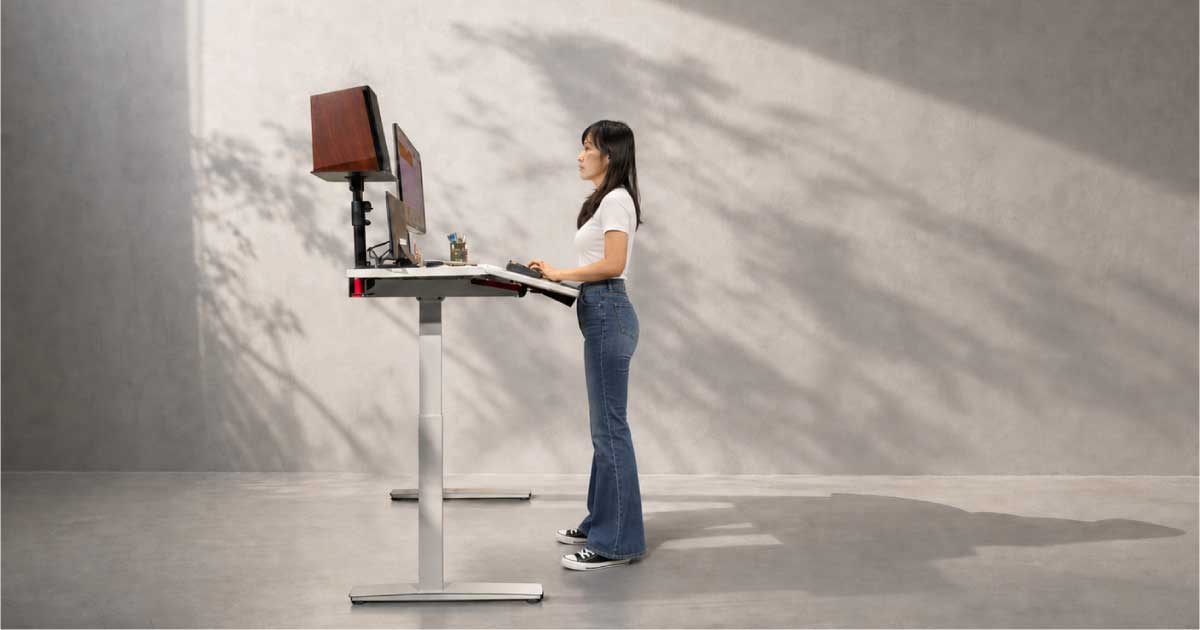
Niture TILT combines electric height adjustment with a Work Board that can move from a conventional flat position at 0° to a maximum angle of 15°.
A level rear zone for monitors, compatible monitor arms, pegboard organisation, equipment and cable management.
The adjustable active zone for the keyboard, mouse, laptop, tablet, documents and daily working tools.
The Work Board does not need to remain tilted. Use it flat when a conventional surface suits the task, or introduce an appropriate angle when bringing the active work area closer improves the working relationship.
Niture TILT has an approximate height range of 75–122 cm. Current dimensions, finishes, specifications, warranty and availability should always be confirmed on the product page.
Use the calculator result as the first entry, then record the settings that work during actual use.
| Setting | Calculator estimate | Tested setting | Notes |
|---|---|---|---|
| Seated keyboard work | ________ | ________ | ________ |
| Standing keyboard work | ________ | ________ | ________ |
| Alternative footwear | ________ | ________ | ________ |
| Reading or tablet task | ________ | ________ | ________ |
| Second regular user | ________ | ________ | ________ |
Note the footwear, chair, keyboard, mat, task, monitor arrangement and work-surface angle used with each measurement.
It is an estimate, not an ergonomic or medical diagnosis.
The keyboard changes the final height of the hands.
Set the input devices first and adjust the monitor separately.
Different soles change your effective height relative to the desk.
The visual angle is not useful when it causes raised shoulders.
Correct vertical height cannot compensate for excessive reach.
Typing, writing, drawing and reading may need different arrangements.
The purpose of a sit–stand desk is to support position changes.
Begin with the keyboard near your standing elbow height or slightly below it. Then test the position while typing. Your shoulders should remain relaxed, your elbows should stay close to your body and your wrists should remain reasonably straight.
They can provide useful estimates based on overall body height, but they cannot account for every body proportion, keyboard, shoe, task or personal preference. Treat the result as a starting point.
No exact angle is suitable for every user and task. Approximately 90 degrees is a practical starting cue, but relaxed shoulders, comfortable reach and reasonably straight wrists are more important than forcing an exact angle.
For general keyboard work, begin around elbow height or slightly below it. The final position depends on keyboard thickness, typing technique and the rest of the workstation.
Yes. Thick soles, slippers, orthotic insoles and standing mats can change your effective height relative to the desk. Recheck the setting when your footwear or floor arrangement changes.
Yes. Seated height depends on the chair, foot support, thigh clearance and seated elbow position. Standing height depends on standing elbow position, footwear and the task. Save them as separate presets.
Possible workstation-related causes include a desk that is too high, equipment that is too far away, unsupported arms, prolonged static standing or an unsuitable monitor position. Persistent or worsening symptoms should be assessed by a qualified healthcare professional.
There is no universal schedule for everyone. Begin with manageable periods, alternate between sitting and standing and change position before discomfort becomes significant. Continue taking breaks away from the workstation.
Compare height range, stability, worktop size, controls, warranty and workspace fit.
Read the buying guide →Explore the dual-zone design, working modes, specifications and limitations.
Explore the TILT guide →Understand what a standing desk may change and what it cannot treat.
Read the health guide →Coordinate the chair, desk, monitor and input devices as one system.
Build the complete setup →Check monitor position, reach, equipment placement and movement habits.
Read the setup guide →View current sizes, finishes, specifications, delivery and warranty information.
View the product →This article distinguishes general workstation setup guidance from medical treatment.
The calibration process reflects established workstation principles, including:
Product specifications and availability should always be checked against current Niture product information before publication or purchase.
A standing desk calculator is not useless, and it is not automatically wrong.
The calculator provides an approximate starting measurement.
Your body, equipment and task determine the final working setting.
Begin near elbow height. Add the actual keyboard and mouse. Relax your shoulders. Test the position during real work. Adjust the monitor separately. Save the setting only after it works for the complete workstation.
The best desk height is not simply the number recommended for someone of your height. It is the setting that helps you work without unnecessary reaching, lifting or holding—while giving you the freedom to sit, stand and move.
Words give you the measurement. Your body gives you the answer.
Share this guide with someone setting up a standing desk, planning a home office or wondering why an online height calculator does not feel right.